
guide
Warranty Management: How to Track Coverage, Claims, and Expiration Dates
Learn how to manage equipment warranties by tracking coverage windows, exclusions, claim steps, service records, contacts, and expiration reminders.
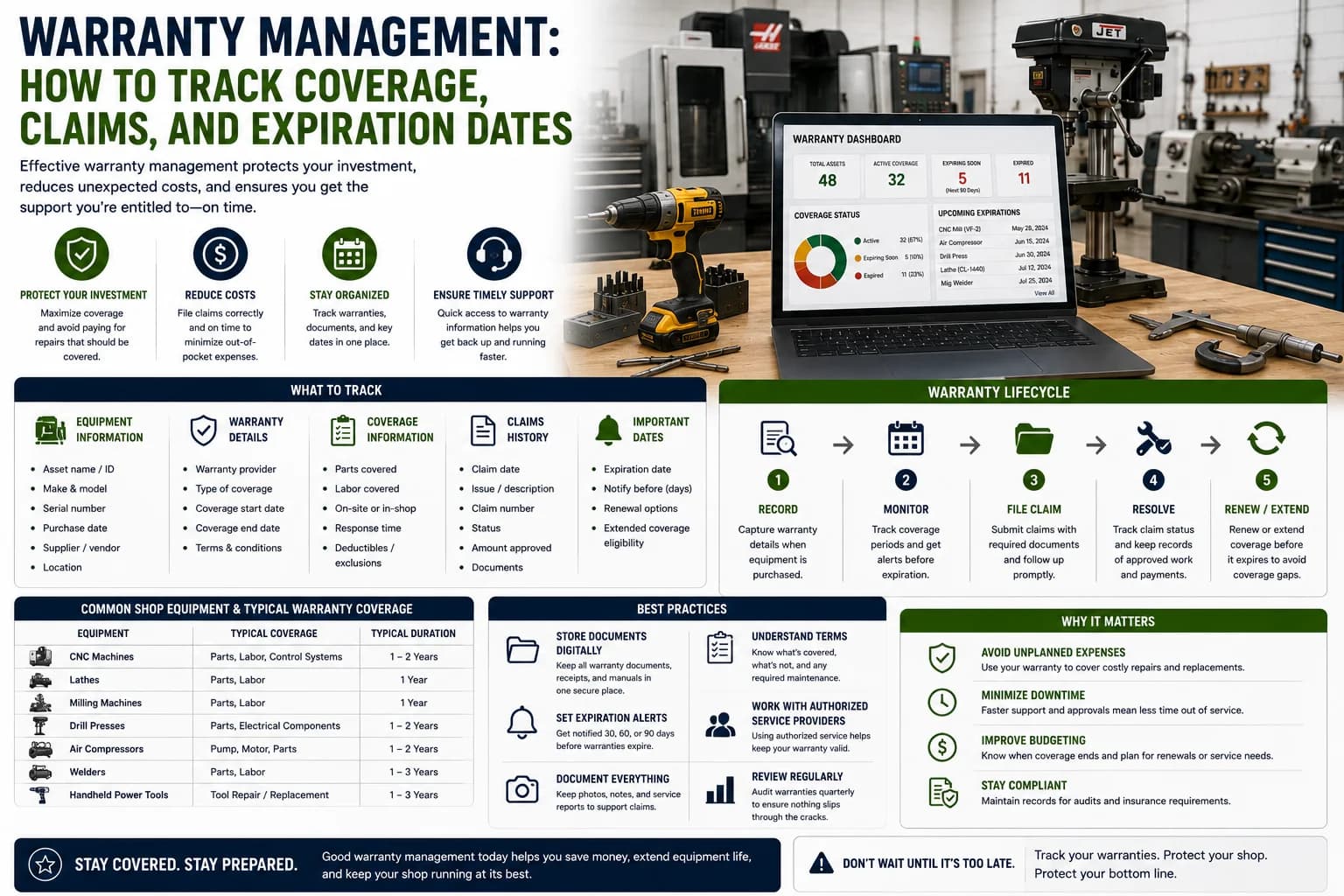
Introduction
Equipment warranties can save businesses money when covered repairs are handled correctly. But warranty value is often lost because coverage details are hard to find, claim deadlines are missed, or required service records are incomplete.
Warranty management is the process of tracking coverage, documents, contacts, exclusions, maintenance requirements, and claim activity for each asset.
This guide explains how businesses can manage equipment warranties more effectively.
What Is Warranty Management?
Warranty management is the organized tracking of warranty coverage throughout the asset lifecycle.
It includes:
- Warranty start date
- Warranty end date
- Provider contact
- Covered components
- Exclusions
- Claim procedures
- Required maintenance
- Claim history
- Supporting documents
The goal is to avoid paying for repairs that should be covered.
Why Warranty Tracking Matters
Poor warranty tracking can lead to:
- Missed claim windows
- Unnecessary repair costs
- Denied claims
- Missing proof of maintenance
- Confusion over coverage
- Lost provider contact information
Warranty records should be attached to the asset, not stored in a forgotten folder.
What to Record
Each warranty record should include:
- Asset ID
- Equipment name
- Manufacturer
- Model
- Serial number
- Warranty provider
- Policy or contract number
- Start date
- End date
- Covered parts
- Exclusions
- Claim instructions
- Contact information
Complete records make warranty decisions faster.
Track Maintenance Requirements
Some warranties require specific maintenance.
Examples include:
- Scheduled inspections
- OEM parts
- Approved service providers
- Fluid change intervals
- Record retention
Missing required maintenance can create claim problems.
Store Supporting Documents
Attach warranty documents to the asset record.
Useful documents include:
- Warranty certificate
- Purchase invoice
- Registration confirmation
- Service records
- Claim forms
- Photos
- Repair estimates
- Claim approvals or denials
The easier records are to find, the easier claims become.
Create Expiration Reminders
Warranty expiration dates should not be discovered after a failure.
Set reminders for:
- Registration deadlines
- Coverage expiration
- Required inspections
- Extended warranty decision dates
- Claim follow-up dates
Calendar reminders help teams act before coverage ends.
Common Warranty Mistakes
Avoid these issues:
Missing Registration
Some warranties require registration after purchase.
Losing Documents
Proof of coverage should be easy to retrieve.
Using Unapproved Parts
Certain repairs may need approved parts or service providers.
Missing Maintenance Records
Claims may require proof that equipment was maintained.
Waiting Too Long
Claim windows can be short.
Warranty Management Checklist
Track:
- Asset ID
- Warranty provider
- Start and end dates
- Covered components
- Exclusions
- Claim process
- Required maintenance
- Provider contacts
- Supporting documents
- Claim history
- Expiration reminders
This helps protect the value of coverage.
Conclusion
Warranty management helps businesses avoid unnecessary repair costs and missed claim opportunities. By tracking coverage dates, exclusions, required maintenance, documents, and claim activity, organizations can make warranty information useful when equipment needs service.
A warranty is only valuable if the team can find and use it before coverage expires.